Overview
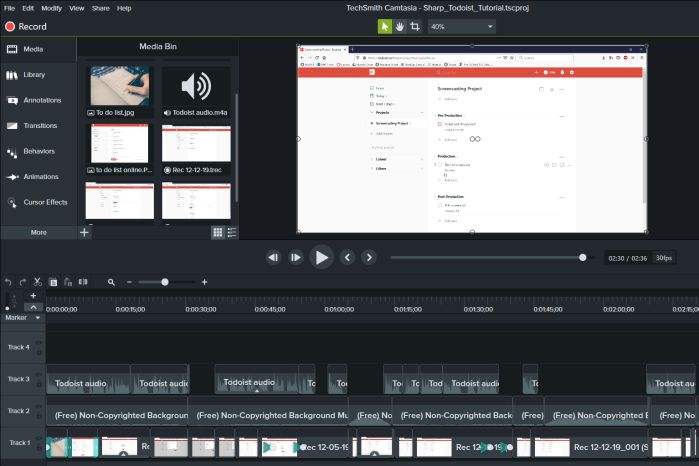
This project was assigned in TECM 5191: Digital Literacies, a graduate Technical Communication course. The assignment’s purpose was to introduce students to the task of producing video help guides and screencasts. Students could choose any web-based product for which to create a tutorial. Camtasia was the assigned software.
I chose to produce a tutorial for project planning in Todoist- a great tool for planning and organizing tasks. I used the desktop version of Todoist for the tutorial.
Task
Initially, there were a few distinct challenges:
- No prior video editing or voice-over experience
- Inadequate sound equipment
- Inexperience recording voice clips
This was my first exposure to Camtasia or any other video-editing software. Students completed a Camtasia tutorial in class before starting the production phase, and this practice really helped me start to get familiar with the program. Camtasia is incredibly user-friendly, and I quickly felt comfortable with the editing process.
As I continue producing video tutorials, it’s imperative that I invest in better audio equipment, or find some that I can borrow from a reliable person. First, I tried recording the audio with just a headset, and the quality was poor. I then recorded the voice-over with my external laptop microphone and the quality was much better, but still not amazing. I had already planned to use background music, so the voice-over quality wasn’t vital in this project, however it will become increasingly important to use professional equipment in the future.
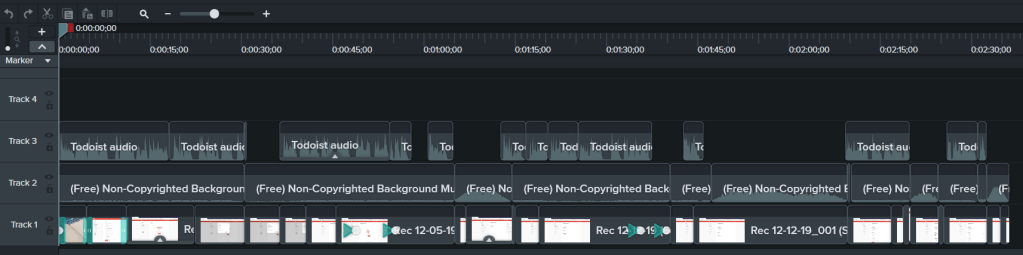
My recording process can also be improved next time around. I chose to record the audio and video separately, both uninterrupted. This process resulted in lots of tiny clips on the timeline in Camtasia after editing (See Figure 1). Smaller clips are a lot easier to misplace on the timeline, so next time I will re-record sections to produce longer audio and video clips for insurance purposes!
Action
There were several steps I took to succeed in this project:
- Practiced reading my script many times pre-production to sound natural and casual
- Used background music to fill the awkward silences
- Re-recorded half of the screencast video after rendering the first time to correct flow
- Used audio fade-in and fade-out to create smooth transitions between voice-over and silence
- Increased clip speed in parts of the tutorial that were repetitive
The above measures allowed me to create an effective web-based product tutorial for others to learn about Todoist’s planning functions. It is valuable content because there are no other video help guides for Todoist- only written instructions.
Results
This assignment rendered a simple and effective tutorial on the planning tool Todoist. The top takeaway of this assignment is that I am now comfortable using Camtasia video editing software, and I feel confident starting other video/audio projects in the future. I was able to use problem-solving methods to create a deliverable that could potentially help other people, and that is priceless.

 Morgan Sharp